Two Boxes is a returns processing platform for warehouses (3PLs) that can integrate with Route to streamline your return workflows. The Route <> Two Boxes integration is a two-way connection: when a return is initiated in Route, an RMA (Return Merchandise Authorization) is automatically created in Two Boxes, and when Two Boxes updates a return’s status (disposition), the return in Route is updated in real time. This ensures that both your customer-facing return portal and your warehouse’s system stay in sync without manual effort.
How It Works
- Return created in Route → RMA in Two Boxes: When you approve a return through Route, Route automatically creates a corresponding RMA in Two Boxes for that return. Your warehouse team using Two Boxes will immediately see the new return in their system, ready to be processed.
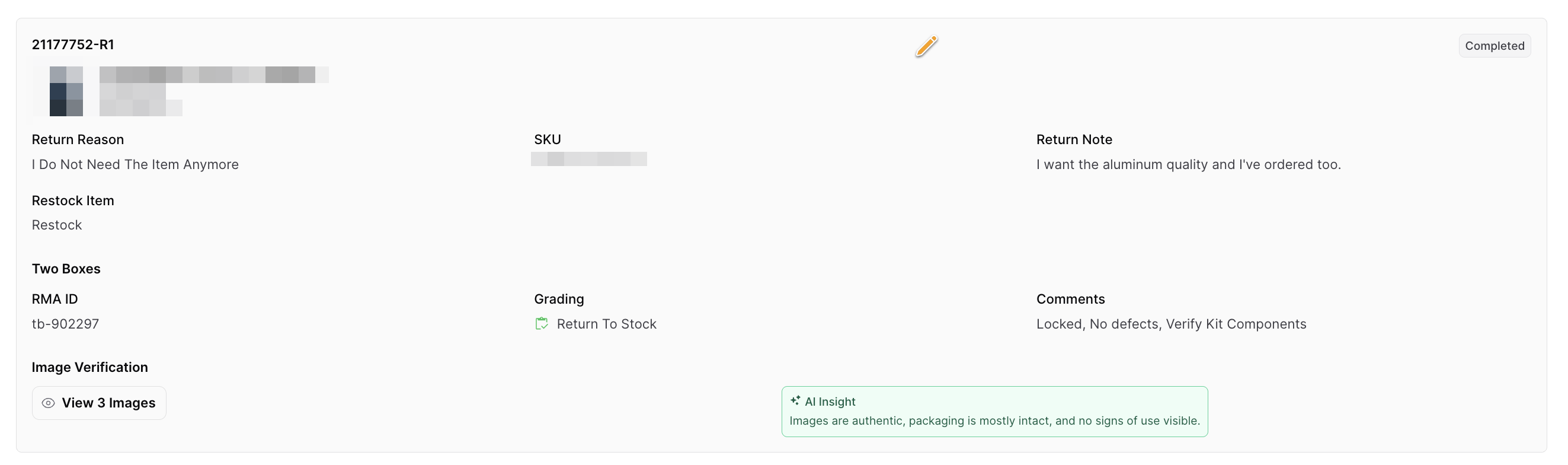
- Warehouse disposition in Two Boxes → Update in Route: Once the warehouse receives and inspects the returned item, the staff selects a disposition in Two Boxes (such as Return to Stock or Donate). Two Boxes instantly sends this disposition update back to Route. Route will then update the return record in your Route dashboard based on the disposition – for example, marking the return as completed, canceled, or flagging it for review, according to your configuration.
Two Boxes Dispositions & Route Settings
Two Boxes uses dispositions to indicate the outcome of a processed return. As a merchant, you can control how each Two Boxes disposition impacts the return’s status in Route. The available disposition outcomes include:
- RETURN_TO_STOCK
- DONATE
- RECYCLE
- MISSING
- DISPOSE
- SHIP_BACK_TO_CUSTOMER
- EXCEPTION
In Route, you decide what each of these outcomes means for the return. You can configure which dispositions should complete the return in Route (marking it as successfully processed) and which should cancel the return. For example, you might set Return to Stock or Donate to complete the return (since the item was recovered or put to use), while dispositions like Missing or Dispose could cancel the return (since the item isn’t recoverable).
You also have control over how "negative" outcomes are handled. Dispositions such as MISSING, DISPOSE, or EXCEPTION can be set to either automatically cancel the return or to just flag the return for manual review instead of auto-canceling. This flexibility lets you decide whether a problematic return should be immediately closed out (auto-canceled) or paused for a staff member to review and take further action. For instance, you may choose to auto-cancel returns for missing items to prevent unauthorized refunds, or flag them so your team can investigate case by case.
Example: Route Return Linked to Two Boxes RMA
Requirements
To enable the Two Boxes integration, you will need to provide Route with your Two Boxes API Access Token and Webhook Identifier (these are usually provided by the Two Boxes team). The Route team will use these credentials to configure the integration internally. Once set up, no additional technical steps are required from you – the integration will begin working automatically based on the behaviour and rules described above.